
Cloud-Based Antivirus for Business: A Practical Guide
Businesses rely on connected devices and cloud services to keep work moving. That connectivity also creates opportunities for cyber criminals, who may target computers, servers and employee accounts with malware, ransomware and other threats. Cloud-based antivirus can help organisations protect their devices while making security easier to manage across different locations.
What is cloud-based antivirus?
Traditional antivirus software typically relies on security tools and threat information stored on each device. Cloud-based antivirus combines software installed on business devices with security services hosted by the provider. The local software can check files and activity, while the cloud service supplies up-to-date threat intelligence and, depending on the product, additional analysis and management features.
Although some parts of the service run in the cloud, endpoint protection generally still needs a component on each device. This allows it to monitor activity and respond to threats locally, including when a device has limited or no internet access. The precise capabilities vary between providers, so businesses should check how a product behaves offline and what information it sends to the cloud.
How it helps protect a business
Cloud-based antivirus can use current threat intelligence to help identify known malicious files and suspicious behaviour. Some business products also include features such as ransomware protection, web filtering, device control and centralised security alerts. Advanced endpoint detection and response (EDR) tools may offer investigation and response capabilities beyond conventional antivirus, but these features are not included in every package.
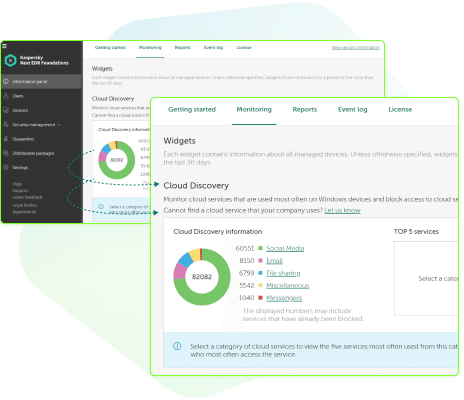
Central management is another important advantage. Administrators can often review protection status, apply policies and investigate alerts from a web-based console. This can be useful for businesses with remote staff, multiple offices or devices that are not always connected to the corporate network.
Potential benefits for businesses
- Centralised administration: Manage settings and view device status from one console, rather than configuring each computer separately.
- Frequent threat updates: Cloud services can distribute new threat information without relying solely on large, manually managed update packages.
- Support for remote working: Devices may remain under management when employees work away from the office, provided they can connect to the service.
- Scalable protection: Cloud-managed services can make it simpler to add or remove devices as an organisation changes.
- Reduced local administration: Depending on the product, the provider may handle parts of the service infrastructure and security intelligence updates.
These benefits depend on the product, configuration and the organisation’s own security practices. Cloud-based antivirus is not a substitute for reliable backups, access controls, staff training or a broader incident response plan.
What to consider before choosing a service
Before purchasing, assess the business’s devices, working practices and security requirements. A small organisation with a handful of laptops may need a straightforward centrally managed product. A larger or more regulated organisation may require detailed reporting, role-based administration, integration with other security tools and access to specialist incident response support.
- Coverage: Confirm that the product supports all relevant operating systems and device types.
- Protection features: Check which capabilities are included in the chosen plan, such as ransomware safeguards, web protection or EDR.
- Offline operation: Find out how devices are protected when they cannot reach the cloud service.
- Privacy and data handling: Review what device or threat data is collected, where it is processed and how long it is retained.
- Administration: Look for clear dashboards, useful alerts and permissions that fit the organisation’s support structure.
- Support and response: Understand the provider’s support hours, response times and responsibilities during a security incident.
- Total cost: Compare the full cost, including licences, optional features, support and any implementation work.
Planning a successful deployment
A measured rollout can reduce disruption and help reveal configuration issues early. Start by listing the devices that need protection and checking for existing security software that could conflict. Pilot the service on a small group of devices, test common business applications and confirm that alerts reach the right people.
Once the pilot is successful, deploy the software in stages. Set policies that match the organisation’s risk level, restrict unnecessary administrative privileges and make sure users know how to report suspicious activity. Assign someone to review security alerts and keep the software, operating systems and applications up to date.
Businesses should also test their backup and recovery arrangements. Antivirus can reduce the likelihood of some attacks, but no single product can guarantee that every threat will be prevented. Backups should be protected from unauthorised access and tested regularly so that important data can be restored if needed.
Cloud-based antivirus and compliance
Security software may support an organisation’s wider security and compliance programme, but using a particular product does not by itself guarantee compliance with data protection law or industry requirements. Businesses should assess how the service handles personal and business data, document relevant decisions, and check that its use fits their legal and contractual obligations.
Is cloud-based antivirus right for your business?
Cloud-based antivirus can be a practical option for organisations that want centrally managed endpoint protection, especially where employees work across multiple locations. The right choice depends on the devices being used, the sensitivity of the data, the level of internal IT support and the organisation’s ability to respond to alerts.
Compare products carefully, test the preferred option and treat antivirus as one layer of a broader security strategy. Combined with timely updates, strong authentication, staff awareness and tested backups, cloud-managed endpoint protection can help businesses manage cyber risks more effectively.
Essential Tips for Choosing and Managing Cloud-Based Antivirus Solutions for Businesses
- Choose a provider with strong business-grade threat detection.
- Check that protection covers every device and operating system.
- Enable automatic updates and real-time scanning.
- Use multi-factor authentication for admin accounts.
- Set clear policies for remote and mobile devices.
- Review alerts regularly and investigate unusual activity.
- Check data residency, privacy and compliance requirements.
- Test backups and incident response plans regularly.
Choose a provider with strong business-grade threat detection.
Choose a provider with strong business-grade threat detection, rather than relying on basic malware scanning alone. Look for features such as real-time monitoring, behavioural analysis and rapid threat intelligence updates, which can help identify suspicious activity and emerging attacks. Check that the provider explains how its protection works, what threats it covers and how alerts are investigated, so you can select a service suited to your organisation’s risks and devices.
Check that protection covers every device and operating system.
Check that your cloud-based antivirus protects every device and operating system used by your business, including laptops, desktops, mobiles and any specialist equipment. Support can vary between Windows, macOS, Linux, Android and iOS, and some features may not be available on every platform. Confirm that all devices can be managed from the same console, and include remote and newly added devices so they do not become gaps in your security.
Enable automatic updates and real-time scanning.
Enable automatic updates and real-time scanning to help your business stay protected against newly identified threats. Automatic updates keep antivirus software and its threat information current without relying on staff to install them manually, while real-time scanning checks files and activity as they are accessed or downloaded. Check that these features are switched on across all business devices, and review the management console regularly to confirm updates are being applied and alerts are not being missed.
Use multi-factor authentication for admin accounts.
Use multi-factor authentication (MFA) for every administrator account that can access your cloud-based antivirus console. Admin accounts have powerful permissions, so a compromised password could let an attacker change security settings, disable protection or access sensitive information. MFA adds an extra verification step, such as an authenticator app or security key, making unauthorised access harder even if a password is stolen. Choose phishing-resistant MFA where available, and ensure recovery methods are also kept secure.
Set clear policies for remote and mobile devices.
Set clear policies for remote and mobile devices so employees know how to keep business data secure wherever they work. Specify which devices must use cloud-based antivirus, require automatic updates and screen locks, and explain what to do if a device is lost, stolen or showing signs of infection. Make sure staff understand how to report security alerts promptly, and review the policies regularly as your technology and working practices change.
Review alerts regularly and investigate unusual activity.
Review security alerts regularly and investigate unusual activity promptly. Repeated failed sign-ins, unexpected software changes or suspicious file activity could indicate a threat, so make sure someone is responsible for checking alerts and knows how to respond. Follow up on genuine concerns, record actions taken and adjust security settings where necessary.
Check data residency, privacy and compliance requirements.
Before choosing a cloud-based antivirus service, check where the provider stores and processes your business data, including security logs and threat reports. Review its privacy policy and contract to understand what information is collected, who can access it, how long it is retained and whether it is shared with third parties. Make sure these arrangements meet your organisation’s data protection, regulatory and contractual obligations, and ask the provider about relevant safeguards, certifications and data-transfer arrangements.
Test backups and incident response plans regularly.
Test backups and incident response plans regularly so your business is prepared if a cyber attack disrupts operations. Check that backups are complete, protected from unauthorised access and can be restored within an acceptable timeframe. Run incident response exercises to clarify who is responsible for each action, how staff should report a suspected threat and how essential services will be restored. Regular testing can reveal gaps before an incident occurs; antivirus is an important safeguard, but it cannot replace a reliable recovery plan.