
Cloud-Based Identity and Access Management: A Guide for Modern Organisations
Employees, contractors, customers and business partners may all need access to digital services. Managing those identities securely can become complicated as organisations adopt cloud applications, support remote working and connect systems across different locations. Cloud-based identity and access management (IAM) helps bring these tasks together.
What is cloud-based IAM?
Identity and access management is the combination of policies, processes and technology used to control who can access digital resources and what they are permitted to do. A cloud-based IAM service delivers some or all of these capabilities through a cloud platform rather than relying solely on systems hosted on an organisation’s premises.
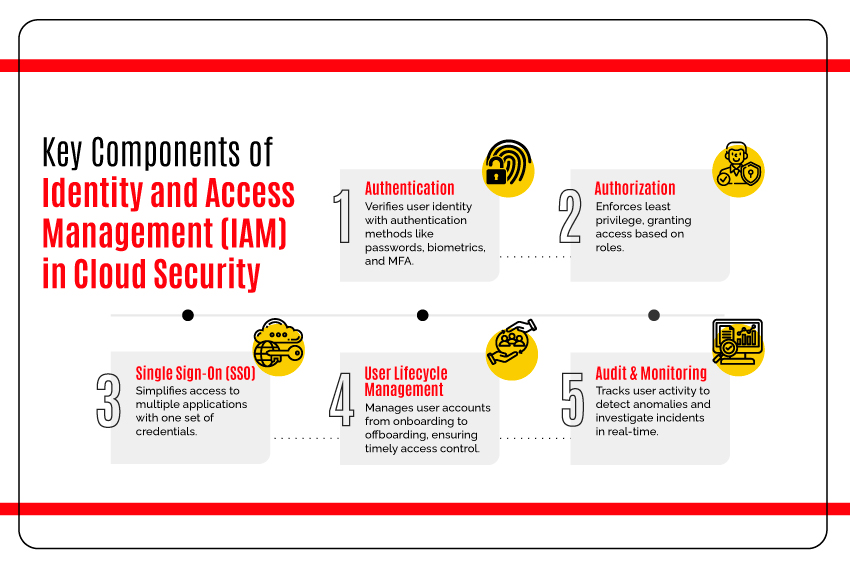
Common IAM functions include creating and managing user accounts, authenticating users, assigning permissions and recording access activity. Many services also support single sign-on (SSO), multi-factor authentication (MFA), password management and automated processes for joining, changing roles and leaving an organisation.
How does it work?
A cloud IAM platform acts as a central point for managing identities and access policies. When someone attempts to use an application or service, the platform can verify their identity and check whether they are authorised to access it.
Authentication confirms that a user is who they claim to be. This may involve a password, an authenticator app, a security key or another approved method. Authorisation determines what that authenticated user can do, such as view a file, update a record or administer an application.
IAM platforms can connect to business applications and directories using established protocols and integrations. This can allow organisations to apply consistent access rules across a mix of cloud-based and on-premises systems.
Potential benefits
- Centralised administration: IT teams can manage identities and access policies from a shared platform, rather than handling each application separately.
- Simpler sign-in: SSO can let users access several approved applications after signing in once, reducing the need to remember multiple passwords.
- Stronger authentication: MFA adds an extra verification step, making it harder for an attacker to access an account using a stolen password alone.
- More consistent access controls: Policies can be applied across supported services, helping reduce differences in how access is managed.
- Faster account changes: Automated workflows can help grant, update or remove access when a person joins, changes role or leaves.
- Improved visibility: Access logs and reports can help teams review account activity, investigate unusual events and support audits.
Important security considerations
Moving identity services to the cloud does not remove the need for careful security management. Organisations should understand how the provider protects and processes identity data, where it is stored, how incidents are handled and what service availability commitments apply.
Administrative accounts deserve particular attention. They should be limited to authorised staff, protected with strong authentication and reviewed regularly. Where possible, everyday accounts should not have administrative privileges. Access should follow the principle of least privilege: users receive only the permissions needed for their duties.
It is also important to plan for service disruption. Organisations should know how users will access essential systems if an identity provider becomes unavailable, and how emergency access will be controlled and monitored. Any fallback arrangements should be tested without creating weaker or untracked routes into business systems.
Choosing a cloud IAM solution
The right platform depends on an organisation’s size, systems, risk profile and regulatory obligations. Before selecting a service, consider:
- Whether it integrates with the organisation’s existing applications, directories and devices.
- Which authentication methods it supports, including MFA and passwordless options.
- How it handles user provisioning, role changes and account removal.
- What reporting, logging and alerting capabilities are available.
- How identity data is protected, retained and deleted.
- Whether the service can support contractors, partners or customers as well as employees.
- How pricing, support, availability and recovery arrangements fit the organisation’s needs.
It is also worth distinguishing workforce IAM from customer identity and access management (CIAM). Workforce IAM focuses on staff and business partners. CIAM is designed for customers and may need to support large numbers of users, account recovery, consent requirements and a smooth sign-in experience.
Planning an implementation
A successful implementation usually starts with an inventory of users, applications and existing access rules. This helps identify outdated accounts, overlapping systems and applications that may not support modern authentication methods.
Organisations can then define clear policies for authentication, permissions and account lifecycle management. A pilot involving a limited group of users or applications can reveal integration issues before a wider rollout. Training and clear communications help users understand new sign-in steps and report suspicious activity.
Once the service is in use, access should be reviewed regularly. Changes to roles, contracts and business needs can quickly make old permissions unnecessary. Monitoring sign-in activity and testing recovery procedures also help ensure that the system continues to meet operational and security requirements.
Conclusion
Cloud-based IAM can make access management more consistent and convenient, while supporting controls such as MFA, SSO and automated account provisioning. It is not a complete security solution on its own: its effectiveness depends on sound policies, careful configuration, regular reviews and a clear plan for service disruption.
By assessing their needs and managing identity as a core part of cybersecurity, organisations can make it easier for authorised people to access the services they need while reducing unnecessary access and exposure.
Understanding Cloud-Based Identity and Access Management: Key Questions Answered
- What is cloud-based identity and access management (IAM)?
- How does cloud-based IAM work?
- What are the benefits of cloud-based IAM for businesses?
- How does cloud-based IAM protect user accounts and data?
- How should an organisation choose a cloud-based IAM solution?
What is cloud-based identity and access management (IAM)?
Cloud-based identity and access management (IAM) is a service that helps an organisation manage digital identities and control access to its applications, systems and data through a cloud platform. It can verify users’ identities, apply permissions based on their roles and support features such as single sign-on and multi-factor authentication. This gives administrators a central way to manage who can access what, while helping users sign in securely to the services they need.
How does cloud-based IAM work?
Cloud-based identity and access management (IAM) uses a central online service to manage user identities and control access to applications and data. When someone tries to sign in, the service verifies their identity—often using a password and multi-factor authentication—then checks their permissions before granting access. It can also provide single sign-on across approved applications, apply consistent security policies and help automate account changes when someone joins, changes role or leaves an organisation.
What are the benefits of cloud-based IAM for businesses?
Cloud-based identity and access management (IAM) helps businesses manage user accounts and permissions from a central platform, making it easier to grant, update or remove access as roles change. It can improve security through features such as multi-factor authentication, single sign-on and consistent access policies, while giving staff convenient access to the applications they need. Automation can reduce routine administrative work, and reporting tools can help businesses monitor account activity and review permissions. Benefits depend on choosing a suitable service and configuring it carefully, with regular access reviews and a plan for service disruption.
How does cloud-based IAM protect user accounts and data?
Cloud-based identity and access management (IAM) protects user accounts and data by verifying identities before granting access and applying permissions based on each user’s role and needs. It can strengthen sign-ins with multi-factor authentication, support single sign-on, and help prevent excessive access through centralised policies. Many services also provide activity logs and alerts to help organisations spot unusual sign-in behaviour, while encryption and security controls help protect data. Effective protection still depends on careful configuration, regular access reviews and secure account recovery processes.
How should an organisation choose a cloud-based IAM solution?
An organisation should choose a cloud-based IAM solution by first identifying its security, operational and compliance requirements, as well as the users, applications and devices it needs to support. Compare options for compatibility with existing systems, authentication methods such as multi-factor authentication and single sign-on, automated account provisioning, access reviews, reporting and audit logs. Also assess how the provider protects identity data, its service availability and support, recovery arrangements, scalability and total cost. A pilot with a small group of users can help confirm that the solution works in practice before it is rolled out more widely.