
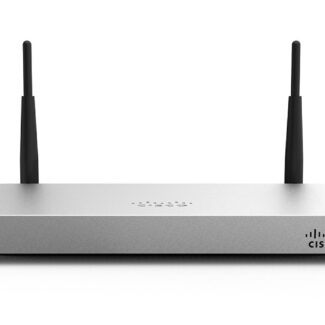
Cisco Meraki MX64 HW: An Overview of the Cloud-Managed Security Appliance
The Cisco Meraki MX64 HW is a compact security appliance designed for small offices, retail sites and branch locations. It combines network security and connectivity features with centralised management through the Cisco Meraki cloud dashboard. “HW” usually refers to the hardware appliance itself; it does not necessarily include a Meraki licence or subscription.
What does the MX64 do?
The MX64 sits between a site’s internet connection and its local network. It can provide firewall protection, support site-to-site VPN connections and help administrators manage network traffic from a central dashboard. This can be useful for organisations that need to oversee several offices without configuring every appliance on site.
Management is a key part of the Meraki approach. Once registered and connected, an MX64 can be configured and monitored through the dashboard, including remotely. Available features depend on the licence, firmware and configuration in use.
Ports and deployment
The MX64 has five Gigabit Ethernet ports for connecting the internet service and local network equipment. Its compact format makes it suitable for a desk, shelf or small network cabinet. It is a wired model; buyers who need built-in wireless should check the separate MX64W model or consider using dedicated wireless access points.
A typical installation places the appliance between the broadband modem or router and the office network. Before deployment, check the internet service, cabling, VPN requirements and any existing network equipment. Organisations with demanding traffic levels or advanced security needs should confirm that the MX64’s capacity is suitable for their workload.
Licensing and cloud management
Buying the hardware alone may not provide access to the full Meraki service. Meraki appliances generally require an active licence for dashboard management and associated features. Licence terms and available functionality can vary, so confirm what is included with the seller and check the current Cisco Meraki licensing information before purchasing.
The cloud dashboard can simplify management, but it also means administrators should consider account access, user permissions and internet connectivity. Keep administrator credentials secure and ensure the appliance is claimed by the correct organisation in the dashboard.
Is the MX64 still a suitable choice?
The MX64 is an older product, so its lifecycle status is an important part of any buying decision. Before purchasing new, refurbished or second-hand hardware, check Cisco’s current end-of-sale and end-of-support information. Support availability, firmware updates and licensing eligibility may affect how long the appliance can be used safely and effectively.
For a used unit, verify that it can be transferred to your Meraki organisation and is not still claimed by another account. Also check the condition of the power supply, ports and casing, and confirm whether a valid licence is available. A newer model may be a better long-term option if continued support, higher capacity or current security features are priorities.
Key points to check before buying
- Whether the listing is for the MX64 hardware only or includes a licence.
- The appliance’s lifecycle and support status with Cisco.
- Whether it is an MX64 or the wireless MX64W model.
- Whether the unit can be transferred and registered in your Meraki dashboard.
- Whether its performance and features meet your site’s requirements.
Summary
The Cisco Meraki MX64 HW is a compact, cloud-managed security appliance intended for smaller networks and branch offices. Its centralised dashboard can make remote administration convenient, but buyers should pay close attention to licensing, product lifecycle and account transfer—particularly when considering used hardware. Check Cisco’s latest documentation and support information before making a purchasing decision.
Frequently Asked Questions About the Cisco Meraki MX64 Hardware
- What is Cisco Meraki MX64 used for?
- Is the Meraki MX64 a router?
- Is Cisco Meraki software or hardware?
- What replaced the Meraki MX64?
- Is Meraki MX64 a router?
- Is Meraki MX64W end of life?
- Does the Meraki MX64 require a license?
What is Cisco Meraki MX64 used for?
The Cisco Meraki MX64 is a compact security appliance used to connect and protect small office or branch networks. It sits between the internet connection and the local network, providing features such as firewall protection, traffic management and site-to-site VPN connectivity. Administrators can configure and monitor it remotely through the Meraki cloud dashboard, subject to an appropriate licence.
Is the Meraki MX64 a router?
Yes. The Cisco Meraki MX64 can act as a router, directing traffic between your local network and the internet, while also providing firewall, VPN and other security features. It is managed through the Meraki cloud dashboard and is typically installed between your internet connection and the devices on your network. Note that it is a wired appliance, and an active Meraki licence may be required for dashboard management and features.
Is Cisco Meraki software or hardware?
Cisco Meraki is both hardware and software. The MX64 HW is the physical security appliance that connects to your network, while its configuration and monitoring are managed through Cisco Meraki’s cloud-based software dashboard. An active licence is generally required to use the dashboard and associated services, so check what is included when purchasing the hardware.
What replaced the Meraki MX64?
The Cisco Meraki MX67 is generally regarded as the successor to the MX64, offering a newer platform for small offices and branch networks. If built-in Wi-Fi is required, the MX67W is the corresponding wireless option; for more connectivity or capacity, compare models such as the MX68. Check Cisco’s current product and licensing information before buying, as availability and support depend on the model and region.
Is Meraki MX64 a router?
Yes. The Cisco Meraki MX64 can act as a router, directing traffic between your local network and the internet. It is also a cloud-managed security appliance, with features such as firewall protection and VPN support. Its exact capabilities depend on how it is configured and on having an appropriate Meraki licence.
Is Meraki MX64W end of life?
Yes. The Cisco Meraki MX64W has reached end of life, so it is no longer a suitable choice for a new deployment where ongoing support and security updates are important. If you already use one, check Cisco Meraki’s current product lifecycle notices for the relevant support dates and plan a move to a supported replacement. Before buying a second-hand unit, also confirm its licensing and dashboard-transfer status.
Does the Meraki MX64 require a license?
Yes. The Cisco Meraki MX64 requires an active Meraki licence to be managed through the Meraki dashboard and to use its licensed features. The appliance hardware alone does not include an ongoing licence, so check whether one is included with your purchase and confirm its term and eligibility with the seller. If the licence expires, Meraki’s licensing terms may affect the appliance’s operation and management; check Cisco’s current guidance before buying or renewing.