
Cloud and IoT Security: Protecting Connected Devices and Data
Cloud services and the Internet of Things (IoT) have transformed how people and organisations store information, manage systems and connect devices. From smart speakers and security cameras to industrial sensors and cloud-based business applications, connected technology offers convenience and efficiency. But every connection can also introduce security risks.
Effective cloud and IoT security is about protecting devices, networks, accounts and data throughout their entire lifecycle. It requires more than installing security software: organisations and individuals need to understand how their technology works, keep it up to date and make sensible security decisions.
What is cloud and IoT security?
Cloud security refers to the measures used to protect data, applications and services hosted or accessed through cloud platforms. These measures may include access controls, encryption, monitoring, backups and security updates.
IoT security focuses on internet-connected devices and the networks they use. IoT devices can include smart home products, wearable technology, connected vehicles, medical equipment and sensors used in workplaces. Many collect or transmit data, and some can control physical systems.
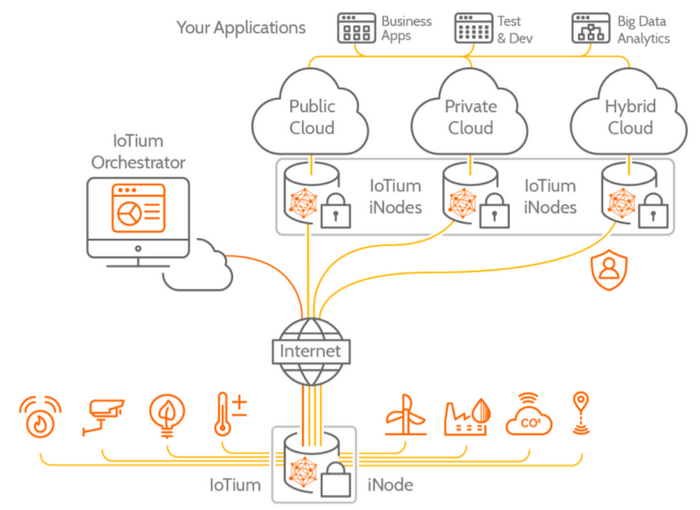
The two areas often overlap. An IoT device may send information to a cloud service, while staff may use cloud-based tools to monitor and manage connected equipment. A weakness in one part of this chain could affect the others.
Common security risks
- Weak or reused passwords: Default credentials and easy-to-guess passwords can make accounts and devices vulnerable to unauthorised access.
- Out-of-date software: Devices and cloud applications that are not updated may contain known security flaws.
- Excessive access: Accounts with more permissions than they need can increase the impact of a compromised login.
- Insecure connections: Poorly protected networks or unencrypted communications may expose data to interception.
- Misconfigured cloud services: Incorrect settings can unintentionally make data or systems accessible to people who should not have access.
- Limited device support: Some IoT products receive security updates for only a limited period, or provide little information about their update policies.
- Supply-chain weaknesses: A device or service may depend on third-party software, components or providers that introduce additional risks.
How to improve cloud security
Cloud security is a shared responsibility. Providers protect the infrastructure they operate, while customers are generally responsible for matters such as account security, access permissions, data handling and service configuration. The exact division depends on the provider and the service being used, so it is important to check the relevant terms and guidance.
- Use multi-factor authentication: Add an extra verification step to important accounts, especially administrator and remote-access accounts.
- Apply the principle of least privilege: Give each user and application only the access needed to do its job, and review permissions regularly.
- Protect data: Use encryption where appropriate, and make sure sensitive information is handled and shared according to your organisation’s policies.
- Review settings: Check sharing options, storage permissions, access logs and security alerts. Avoid making services or files public unless there is a clear reason.
- Back up important information: Keep backups that are protected from unauthorised changes and test that data can be restored.
- Monitor activity: Review alerts and logs for unusual sign-ins, unexpected changes or suspicious data access.
How to improve IoT security
IoT security begins before a device is installed. Choosing products from reputable manufacturers can help, particularly when they provide clear information about software updates, privacy and end-of-life support.
- Change default passwords: Set a unique, strong password for each device or account where possible.
- Install updates: Enable automatic updates when appropriate, or check regularly for firmware and software updates.
- Secure the network: Use modern Wi-Fi security settings and change the router’s default administrator password. Consider placing smart devices on a separate guest or IoT network if your router supports it.
- Disable features you do not use: Turn off unnecessary remote access, microphones, cameras or services when they are not needed.
- Check privacy settings: Understand what information a device collects, where it is stored and how it is used.
- Replace unsupported devices: If a product no longer receives security updates, assess whether it should be replaced or removed from the network.
Build security into the whole lifecycle
For organisations, security should be considered when selecting, buying, deploying and retiring cloud services and IoT devices. Keep an inventory of connected assets, assign clear ownership and establish a process for applying updates. Staff should also know how to report lost devices, suspicious activity or potential security incidents.
Before introducing a new system, consider what data it handles, which other services it connects to and what could happen if it were unavailable or accessed without permission. A practical risk assessment can help identify suitable safeguards without relying on a one-size-fits-all approach.
Conclusion
Cloud platforms and IoT devices can bring real benefits, but their security depends on careful choices and ongoing attention. Strong authentication, limited access, timely updates, secure configurations and reliable backups all help reduce risk. By treating connected technology as part of a wider security system, individuals and organisations can make better use of the cloud and IoT while protecting their data and devices.
Cloud and IoT Security: 7 Frequently Asked Questions
- What is cloud and IoT security?
- What are the most common security risks associated with cloud services and IoT devices?
- How can I secure my IoT devices at home?
- How can businesses protect data stored in the cloud?
- Why are software and firmware updates important for cloud and IoT security?
- How does multi-factor authentication help protect cloud accounts and connected devices?
- Who is responsible for cloud security
What is cloud and IoT security?
Cloud and IoT security refers to the measures used to protect data, services and internet-connected devices from unauthorised access, misuse and cyber attacks. Cloud security can include safeguards such as encryption, access controls, multi-factor authentication and backups, while IoT security focuses on protecting devices such as smart cameras, sensors and connected appliances, along with the networks they use. Because IoT devices often send information to cloud services, securing both is important for keeping data and systems safe.
What are the most common security risks associated with cloud services and IoT devices?
The most common security risks include weak or reused passwords, outdated software and poor configuration, which can leave cloud accounts, data and connected devices open to unauthorised access. Misconfigured cloud storage may expose sensitive information, while insecure IoT devices can provide an entry point into a home or business network. Other concerns include unencrypted data, excessive user permissions, limited manufacturer support and vulnerabilities in third-party services. Regular updates, strong unique passwords, multi-factor authentication and careful access controls can help reduce these risks.
How can I secure my IoT devices at home?
To secure IoT devices at home, change any default passwords to strong, unique ones and install software or firmware updates as soon as they become available. Protect your Wi-Fi router with a strong administrator password and up-to-date security settings, and consider connecting smart devices to a separate guest network if your router allows it. Disable features and remote access you do not use, review each device’s privacy settings, and replace products that no longer receive security updates.
How can businesses protect data stored in the cloud?
Businesses can protect data stored in the cloud by using strong, unique passwords and multi-factor authentication, and limiting access to only those who need it. They should encrypt sensitive data, review cloud security settings and permissions regularly, keep software up to date, and monitor accounts for unusual activity. Regular backups and a tested recovery plan can help restore data if it is lost, damaged or affected by an attack. It is also important to understand which security responsibilities belong to the cloud provider and which remain with the business.
Why are software and firmware updates important for cloud and IoT security?
Software and firmware updates are important because they often fix security weaknesses that attackers could exploit to access accounts, devices or data. Cloud services are typically updated by their providers, while IoT devices may need updates installed by the user or administrator. Keeping both up to date helps protect connected systems, improves reliability and may add security features. Enable automatic updates where appropriate, or check regularly for updates, and replace devices that no longer receive security support.
How does multi-factor authentication help protect cloud accounts and connected devices?
Multi-factor authentication (MFA) adds an extra check when you sign in, such as a code from an authenticator app or a prompt on a trusted device. This means a password alone is less likely to be enough for someone to access your cloud account if it has been stolen or guessed. Where supported, enable MFA for cloud services, device-management apps and administrator accounts, and choose a secure method that you can access reliably. MFA does not replace strong, unique passwords or software updates, but it provides an important additional layer of protection.
Who is responsible for cloud security
Responsibility for cloud security is shared between the cloud provider and the customer, although the exact split depends on the service and contract. Providers typically secure the underlying infrastructure, while customers are usually responsible for protecting their accounts and data, managing access permissions, configuring services safely and keeping their applications up to date. Check your provider’s security guidance and review settings regularly so you understand which measures you need to manage.