
Kaspersky Endpoint Security and Management
Kaspersky Endpoint Security and Management is a comprehensive solution designed to protect businesses of all sizes from cyber threats. With its advanced features and robust security measures, Kaspersky offers a powerful defence system against malware, ransomware, phishing attacks, and other online risks.
One of the key features of Kaspersky Endpoint Security is its multi-layered protection approach. By combining signature-based antivirus with behavioural analysis and cloud-assisted technologies, Kaspersky ensures that your endpoints are shielded from both known and emerging threats.
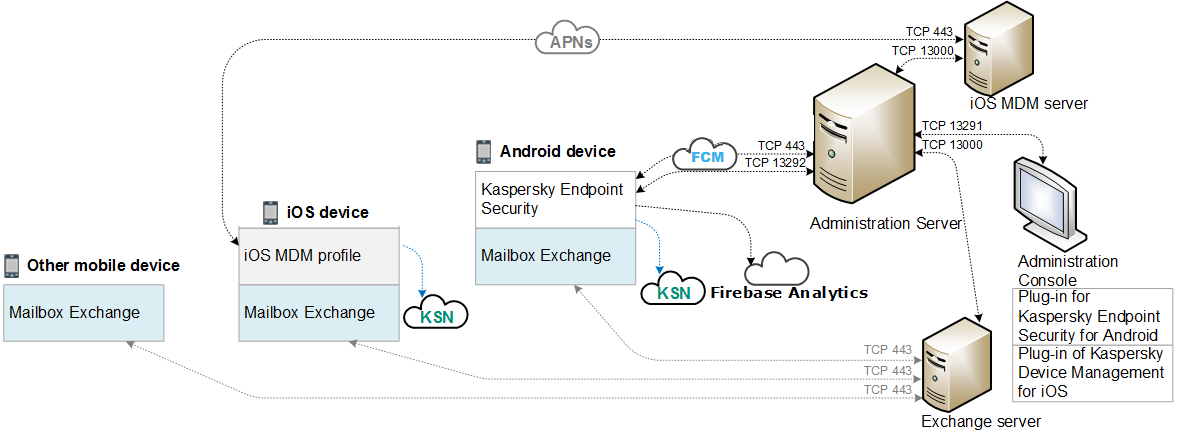
With Kaspersky Endpoint Security, businesses can centrally manage security policies, monitor endpoint activities in real-time, and respond to incidents promptly. The management console provides administrators with a comprehensive view of the network’s security status, allowing them to make informed decisions to enhance protection.
Moreover, Kaspersky Endpoint Security offers encryption capabilities to safeguard sensitive data stored on endpoints. By encrypting files and folders, businesses can prevent unauthorised access and comply with data protection regulations.
In addition to its security features, Kaspersky Endpoint Security is known for its user-friendly interface and minimal impact on system performance. This ensures that employees can work efficiently without compromising security.
In conclusion, Kaspersky Endpoint Security and Management is a reliable solution for businesses looking to fortify their cybersecurity posture. With its comprehensive protection measures, centralised management capabilities, and user-friendly interface, Kaspersky helps organisations stay ahead of cyber threats in today’s digital landscape.
Essential Tips for Optimising Kaspersky Endpoint Security and Management
- Regularly update Kaspersky Endpoint Security and Management to ensure protection against the latest threats.
- Configure strong password policies for accessing the Kaspersky console to prevent unauthorised access.
- Utilise the centralised management features to streamline security administration across all endpoints.
- Perform regular system scans to detect and remove any potential malware or security risks.
- Implement device control policies to manage and restrict external devices that can connect to endpoints.
- Enable real-time protection features to proactively identify and block threats before they can cause harm.
- Regularly backup critical data on endpoints to mitigate risks of data loss in case of a security incident.
Regularly update Kaspersky Endpoint Security and Management to ensure protection against the latest threats.
It is crucial to regularly update Kaspersky Endpoint Security and Management to guarantee optimal protection against the ever-evolving landscape of cyber threats. By staying up-to-date with the latest software updates, patches, and threat intelligence feeds, businesses can fortify their defence mechanisms and effectively shield their endpoints from emerging security risks. Regular updates ensure that Kaspersky’s security measures are equipped to combat the newest threats, providing a proactive approach to cybersecurity that enhances overall resilience and safeguards critical data and systems.
Configure strong password policies for accessing the Kaspersky console to prevent unauthorised access.
To enhance the security of your Kaspersky Endpoint Security and Management system, it is crucial to configure strong password policies for accessing the Kaspersky console. By setting up robust password requirements, such as using a combination of letters, numbers, and special characters, you can significantly reduce the risk of unauthorised access to sensitive security settings and data. Implementing strict password protocols helps fortify your defence against potential cyber threats and ensures that only authorised personnel can access and manage the Kaspersky console effectively.
Utilise the centralised management features to streamline security administration across all endpoints.
By utilising the centralised management features of Kaspersky Endpoint Security and Management, businesses can streamline security administration across all endpoints effectively. This feature allows administrators to centrally monitor and control security policies, ensuring consistent protection and quick response to any security incidents. By managing security settings from a single console, organisations can save time and resources while maintaining a high level of security across their network.
Perform regular system scans to detect and remove any potential malware or security risks.
Performing regular system scans is a crucial aspect of maintaining a secure environment with Kaspersky Endpoint Security and Management. By conducting routine scans, you can proactively detect and eliminate any lurking malware or security risks that may compromise your system. This proactive approach helps to ensure that your endpoints remain protected and free from potential threats, safeguarding your business data and operations effectively.
Implement device control policies to manage and restrict external devices that can connect to endpoints.
Implementing device control policies is a crucial tip when utilising Kaspersky Endpoint Security and Management. By setting up these policies, businesses can effectively manage and restrict external devices that attempt to connect to endpoints. This proactive approach helps prevent potential security breaches caused by unauthorised devices accessing sensitive data. With the ability to control which external devices are allowed to connect, organisations can enhance their overall cybersecurity posture and mitigate the risks associated with untrusted hardware.
Enable real-time protection features to proactively identify and block threats before they can cause harm.
By enabling the real-time protection features in Kaspersky Endpoint Security and Management, businesses can take a proactive approach to cybersecurity. This feature allows the system to continuously monitor for threats and swiftly identify and block malicious activities before they have a chance to cause harm. By staying vigilant in real-time, organisations can effectively mitigate risks and safeguard their endpoints from potential cyber threats, ensuring a secure digital environment for their operations.
Regularly backup critical data on endpoints to mitigate risks of data loss in case of a security incident.
Regularly backing up critical data on endpoints is a crucial proactive measure to mitigate the risks of data loss in the event of a security incident. By ensuring that important files and information are securely backed up, businesses using Kaspersky Endpoint Security and Management can significantly reduce the impact of potential cyber threats such as malware or ransomware attacks. In the unfortunate event of a security breach, having up-to-date backups allows for swift recovery and minimises downtime, enabling organisations to resume operations with minimal disruption. This simple yet effective tip serves as an essential part of a comprehensive cybersecurity strategy to safeguard valuable data and maintain business continuity.