
Cloud-Based Endpoint Security: A Practical Guide
Laptops, desktops, mobile phones and servers are all potential entry points for cyber attacks. As organisations adopt remote and hybrid working, protecting these devices has become more complex. Cloud-based endpoint security can help by bringing device protection, monitoring and management together through cloud-hosted services.
What is cloud-based endpoint security?
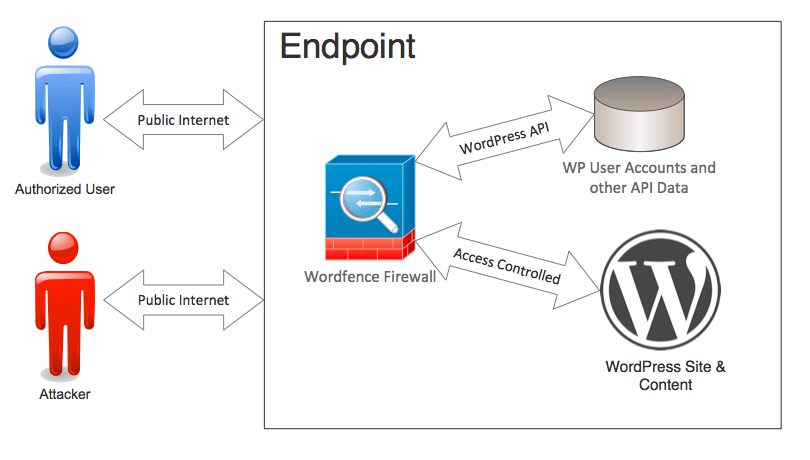
An endpoint is any device that connects to an organisation’s network or services. Cloud-based endpoint security uses security software on those devices, combined with tools and services hosted in the cloud, to help detect and respond to threats.
Typically, a lightweight agent is installed on each endpoint. It gathers relevant security information and applies protection locally, while communicating with a central cloud platform. Administrators can use that platform to review alerts, manage settings and monitor devices across different locations.
The term can describe a range of products, from cloud-managed antivirus to endpoint detection and response (EDR) platforms. Capabilities vary, so it is important to check precisely what a service includes.
How does it work?
Cloud-based endpoint security generally combines several processes:
- Prevention: The software may block known malicious files, unsafe activity or suspicious connections.
- Detection: It can look for unusual behaviour, such as an application attempting to encrypt large numbers of files.
- Analysis: Security events can be assessed using information from the endpoint and, depending on the product, threat intelligence or other data held by the provider.
- Response: Administrators may be able to isolate a device, block a process or investigate an alert from the management console.
- Central management: Policies, updates and alerts can be managed from one place rather than configured separately on every device.
Some protection continues on the device if its connection to the cloud is interrupted. However, the level of offline protection and the ability to send alerts or receive policy changes during an outage depend on the product.
Potential benefits
Centralised management
A cloud console can give security teams a consolidated view of enrolled devices, alerts and policy settings. This can simplify administration, particularly for organisations with staff working across multiple sites.
Support for remote work
Because management is delivered over the internet, devices may be monitored and managed without being connected to an office network. This can make it easier to maintain consistent protection for remote and travelling staff.
Access to current threat information
Cloud services may use frequently updated security information to help identify emerging threats. The speed and effectiveness of updates vary between providers, and cloud connectivity alone does not guarantee better detection.
Flexible deployment
Many services are offered on a subscription basis and can be scaled as an organisation’s device estate changes. This may reduce the need to maintain dedicated security management infrastructure, although organisations still need to account for subscription, implementation and support costs.
Faster investigation and response
EDR features can help teams review the sequence of activity around an alert and take action remotely. These capabilities can be valuable when a device is compromised, but they require suitable processes and staff to interpret and act on the information.
Challenges and considerations
Internet connectivity
Cloud-managed services rely on connectivity for central monitoring, reporting and some management functions. Organisations should understand what protection remains available during an outage and how devices behave when they reconnect.
Privacy and data handling
Endpoint tools may collect information about devices, files, processes and security events. Before choosing a service, review what data is collected, where it is stored, how long it is retained and who can access it. Check the provider’s terms and privacy information, and consider any applicable UK data protection obligations.
Alert volume and skills
More visibility can also mean more alerts. Without clear triage procedures, important warnings may be missed among less urgent events. Organisations should assess whether they have the people and expertise to manage the service or whether additional support is needed.
Compatibility and performance
Check that the software works with the organisation’s operating systems, business applications and existing security tools. Test it on a representative group of devices before wider deployment, and monitor for performance or compatibility issues.
Provider dependence
A cloud service creates reliance on the provider’s platform, availability and support. Review service commitments, incident communication arrangements, data export options and what happens if the organisation changes supplier.
How to choose a solution
Start by identifying the devices that need protection and the risks the organisation is trying to manage. Compare products based on their actual features rather than their marketing labels. Useful questions include:
- Which operating systems and device types are supported?
- Does the service provide antivirus, EDR, or both?
- What actions can administrators take remotely?
- What information is collected and where is it processed or stored?
- How are alerts prioritised, and what support is available?
- What protection continues when a device is offline?
- How does the product integrate with existing identity, email and security systems?
- What are the full costs, including onboarding, training and ongoing management?
A trial or limited pilot can help reveal practical issues before a full rollout. Include different device types and working patterns in the test, and agree in advance how success will be measured.
Good practice for endpoint protection
Cloud-based endpoint security is one part of a broader security strategy. Its effectiveness can be improved by:
- Keeping operating systems and applications up to date.
- Using multi-factor authentication for accounts, especially administrator accounts.
- Applying least-privilege access so users have only the permissions they need.
- Maintaining tested, separate backups of important data.
- Training staff to recognise phishing and report suspicious activity.
- Reviewing alerts and device coverage regularly.
- Preparing an incident response plan and practising how it will be used.
Conclusion
Cloud-based endpoint security can make it easier to protect and manage devices across offices, homes and other locations. It can provide central oversight and support remote response, but it is not a complete solution on its own. Organisations should assess a service’s capabilities, data practices, reliability and management requirements, then combine it with sound security policies, staff training and regular maintenance.
Top 5 Advantages of Cloud-Based Endpoint Security for Modern Organisations
- Centralised security management
- Protects remote devices
- Scales as organisations grow
- Cloud-updated threat intelligence
- Enables faster threat response
Challenges of Cloud-Based Endpoint Security: Connectivity Dependence, Privacy Concerns, and Alert Management
- Relies on internet connectivity for central management and monitoring.
- May raise privacy concerns due to the collection of device data.
- Can generate many alerts, requiring time and expertise to manage.
Centralised security management
Centralised security management gives IT teams one place to monitor and manage endpoint protection across an organisation. Through a cloud-based console, administrators can review device status, apply security policies, deploy updates and investigate alerts without configuring each device individually. This can make routine security tasks more consistent and help teams respond more quickly, particularly when staff work across multiple offices or remotely.
Protects remote devices
Cloud-based endpoint security helps protect devices wherever they connect to the internet, not just when they are on the office network. This is particularly useful for remote and hybrid teams, as laptops and other devices can continue to receive security policies, updates and monitoring while staff work from home or travel. Centralised management also helps IT teams identify potential threats and respond to issues across the organisation without needing physical access to each device.
Scales as organisations grow
Cloud-based endpoint security can scale as an organisation grows, making it easier to protect new users and devices without building additional on-site security infrastructure. Administrators can often add endpoints and adjust subscriptions through a central platform, helping protection keep pace with changes in staffing, locations and working practices. The ease and cost of scaling will depend on the provider’s pricing, product limits and deployment process.
Cloud-updated threat intelligence
Cloud-based endpoint security can draw on threat intelligence that is updated centrally and shared with protected devices, helping them recognise newly identified malware, suspicious websites and emerging attack patterns. This can reduce the delay between a threat being discovered and protection becoming available across an organisation. The effectiveness of this benefit depends on the provider’s update frequency, the quality of its intelligence and whether devices can connect to the service.
Enables faster threat response
Cloud-based endpoint security can help organisations respond to threats more quickly by bringing alerts and device activity together in a central console. Security teams can investigate suspicious behaviour and, where the product allows, take action remotely—such as isolating a compromised device or blocking a malicious process—without waiting for it to return to the office. This can help limit the spread of an attack, although response times depend on the service’s capabilities, internet connectivity and the team’s monitoring procedures.
Relies on internet connectivity for central management and monitoring.
A key drawback of cloud-based endpoint security is its reliance on an internet connection for central management and monitoring. If connectivity is lost or disrupted, administrators may be unable to view alerts, change security policies or manage devices remotely until the connection is restored. Some products continue to provide protection directly on the device while offline, but monitoring and response capabilities may be limited in the meantime.
May raise privacy concerns due to the collection of device data.
Cloud-based endpoint security may raise privacy concerns because it can collect information about devices, applications, files and user activity to identify potential threats. This data may be sent to the provider’s cloud platform for analysis, so organisations should understand what is collected, how it is used, where it is stored and who can access it. Clear policies, careful supplier checks and transparent communication with staff can help address these concerns.
Can generate many alerts, requiring time and expertise to manage.
Cloud-based endpoint security can generate a high volume of alerts as it monitors activity across many devices. Security teams need the time and expertise to assess these notifications, distinguish genuine threats from false alarms and respond appropriately. Without effective alert prioritisation and clear procedures, important warnings may be overlooked, while investigating less serious events can divert staff from other security work.