
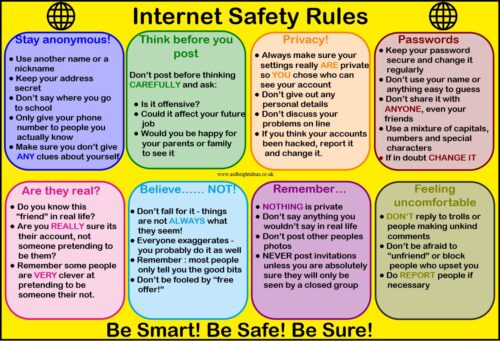
Internet Safety Rules: Protect Yourself Online
In today’s digital age, the internet plays a central role in our daily lives. While it offers numerous benefits and opportunities, it also poses various risks to our privacy and security. To navigate the online world safely, it is essential to follow internet safety rules diligently. Here are some crucial rules to help you protect yourself online:
- Use Strong Passwords: Create unique and complex passwords for each of your online accounts. Avoid using easily guessable information such as birthdays or names.
- Enable Two-Factor Authentication: Add an extra layer of security to your accounts by enabling two-factor authentication whenever possible.
- Beware of Phishing Attempts: Be cautious of suspicious emails, messages, or websites that may attempt to steal your personal information. Do not click on links from unknown sources.
- Keep Your Software Updated: Regularly update your operating system, antivirus software, and other applications to patch security vulnerabilities and protect against cyber threats.
- Limit Sharing Personal Information: Be mindful of the information you share online, especially on social media platforms. Avoid disclosing sensitive details that could be used against you.
- Safeguard Your Privacy Settings: Review and adjust the privacy settings on your social media accounts and other online platforms to control who can access your information.
- Avoid Public Wi-Fi for Sensitive Activities: Refrain from conducting sensitive transactions or sharing confidential data while connected to public Wi-Fi networks, as they may be vulnerable to hackers.
- Educate Yourself About Online Threats: Stay informed about common online threats such as malware, ransomware, and identity theft. Educate yourself on how to recognise and respond to potential risks.
By adhering to these internet safety rules and practising vigilance while browsing the web, you can significantly reduce the likelihood of falling victim to cyber attacks or privacy breaches. Remember that safeguarding your online security is a continuous effort that requires awareness and proactive measures. Stay safe online!
Essential Internet Safety Rules: FAQs on Protecting Your Online Security and Privacy
- What are internet safety rules?
- How can I create strong passwords for online accounts?
- Why is two-factor authentication important for online security?
- What should I do to avoid falling for phishing attempts?
- Why is it crucial to keep software updated for internet safety?
- How can I protect my personal information when using the internet?
- What are the best practices for adjusting privacy settings on social media platforms?
- Why should I avoid using public Wi-Fi networks for sensitive activities?
What are internet safety rules?
Internet safety rules encompass a set of guidelines designed to protect individuals from online threats and ensure their security while navigating the digital landscape. These rules outline best practices for safeguarding personal information, preventing cyber attacks, and maintaining privacy online. By adhering to internet safety rules, individuals can mitigate risks such as identity theft, phishing scams, malware infections, and other cyber threats. These guidelines often include recommendations on creating strong passwords, being cautious of suspicious emails or websites, updating software regularly, and educating oneself about common online risks. Following internet safety rules is essential in today’s interconnected world to stay safe and secure while using the internet.
How can I create strong passwords for online accounts?
When it comes to creating strong passwords for your online accounts, it’s essential to follow a few key guidelines to enhance security. Start by crafting passwords that are unique and complex, incorporating a mix of uppercase and lowercase letters, numbers, and special characters. Avoid using easily guessable information such as birthdays, names, or common phrases. Consider using passphrases that are easy for you to remember but difficult for others to crack. Additionally, refrain from reusing passwords across multiple accounts to prevent potential security breaches. Regularly updating your passwords and enabling two-factor authentication can further bolster the protection of your online accounts. By implementing these practices, you can strengthen the security of your digital presence and safeguard your sensitive information effectively.
Why is two-factor authentication important for online security?
Two-factor authentication is crucial for online security because it adds an extra layer of protection beyond just a password. By requiring users to provide a second form of verification, such as a code sent to their mobile device or generated by an authenticator app, two-factor authentication significantly reduces the risk of unauthorised access to accounts. Even if a cybercriminal manages to obtain your password through phishing or other means, they would still need the additional verification to gain entry. This additional step enhances security and helps safeguard sensitive information and personal data from potential breaches and identity theft.
What should I do to avoid falling for phishing attempts?
To avoid falling for phishing attempts, it is crucial to exercise caution and be vigilant when encountering suspicious emails, messages, or websites. Always verify the sender’s identity before clicking on any links or providing personal information. Look out for red flags such as grammatical errors, urgent requests for sensitive data, or unfamiliar sender addresses. Avoid sharing personal details or login credentials in response to unsolicited messages. When in doubt, contact the purported sender through a verified channel to confirm the legitimacy of the communication. By staying informed about common phishing tactics and practising scepticism online, you can protect yourself from falling victim to fraudulent schemes.
Why is it crucial to keep software updated for internet safety?
Keeping software updated is crucial for internet safety as updates often contain patches for known security vulnerabilities. Cybercriminals are constantly evolving their tactics to exploit weaknesses in software applications, operating systems, and antivirus programs. By regularly updating your software, you ensure that these vulnerabilities are addressed promptly, reducing the risk of falling victim to cyber attacks such as malware infections or data breaches. Updated software also enhances overall system performance and functionality, providing a smoother and more secure online experience. Prioritising software updates is a fundamental aspect of maintaining robust internet safety practices and safeguarding your digital assets from potential threats.
How can I protect my personal information when using the internet?
When it comes to safeguarding your personal information while using the internet, there are several crucial steps you can take to enhance your online security. Firstly, ensure that you use strong and unique passwords for each of your online accounts and enable two-factor authentication whenever possible to add an extra layer of protection. Be cautious of phishing attempts by avoiding clicking on suspicious links or sharing sensitive information with unknown sources. Regularly update your software and devices to patch security vulnerabilities, and consider using a reputable antivirus program to protect against malware. Lastly, be mindful of the information you share online and adjust your privacy settings on social media platforms to control who can access your data. By adopting these internet safety practices, you can significantly reduce the risk of compromising your personal information online.
What are the best practices for adjusting privacy settings on social media platforms?
When it comes to adjusting privacy settings on social media platforms, the best practices involve taking proactive steps to safeguard your personal information and control who can access your content. Start by reviewing the privacy settings offered by the platform and customising them to suit your comfort level. This includes setting restrictions on who can view your posts, photos, and personal details. Additionally, consider limiting the visibility of your profile to only friends or connections you trust. Regularly review and update these settings as platforms may introduce new features or changes that could impact your privacy. By being mindful of your online presence and managing your privacy settings effectively, you can enhance your security and protect your data from unauthorised access.
Why should I avoid using public Wi-Fi networks for sensitive activities?
When considering internet safety rules, it is crucial to understand why avoiding the use of public Wi-Fi networks for sensitive activities is recommended. Public Wi-Fi networks, such as those found in cafes, airports, or hotels, are often unsecured and susceptible to cyber threats. Hackers can easily intercept data transmitted over these networks, potentially gaining access to your personal information, passwords, or financial details. By refraining from conducting sensitive activities, such as online banking or entering login credentials, while connected to public Wi-Fi, you reduce the risk of falling victim to data breaches and safeguard your privacy and security online.