
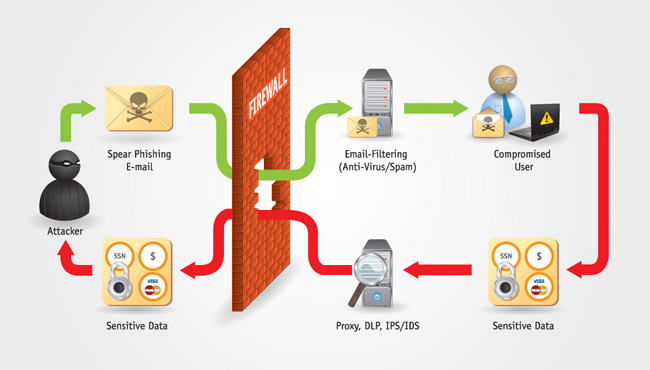
Phishing Prevention: Protecting Yourself Online
Phishing is a common cyber threat that targets individuals by tricking them into revealing sensitive information such as passwords, credit card details, and personal data. It is essential to be vigilant and proactive in preventing falling victim to phishing attacks.
Tips for Phishing Prevention:
- Be Skeptical of Emails: Be cautious of emails requesting personal information or urging immediate action. Verify the sender’s email address and look out for spelling errors or suspicious links.
- Avoid Clicking on Suspicious Links: Hover over links in emails to check their legitimacy before clicking on them. Do not provide any information on unfamiliar websites.
- Keep Software Updated: Ensure that your operating system, antivirus software, and web browsers are up to date with the latest security patches to prevent vulnerabilities that phishers may exploit.
- Use Two-Factor Authentication: Enable two-factor authentication for your online accounts to add an extra layer of security in case your password is compromised through a phishing attack.
- Educate Yourself: Stay informed about common phishing tactics and trends. Regularly educate yourself and your family members about the importance of online security practices.
Reporting Phishing Attempts:
If you receive a suspicious email or encounter a potential phishing website, report it to the relevant authorities or the company being impersonated. By reporting phishing attempts, you can help prevent others from falling victim to similar scams.
Conclusion
Phishing attacks continue to pose a significant threat to individuals and organisations worldwide. By following these tips for phishing prevention and staying vigilant online, you can protect yourself from falling prey to malicious actors seeking to steal your valuable information.
Six Essential Tips for Preventing Phishing Attacks
- Be cautious of emails asking for personal information or login credentials.
- Verify the sender’s email address before clicking on any links or attachments.
- Avoid providing sensitive information through email or unfamiliar websites.
- Use two-factor authentication for an extra layer of security.
- Keep your software and antivirus programs up to date to prevent phishing attacks.
- Educate yourself and others about common phishing tactics and how to spot them.
Be cautious of emails asking for personal information or login credentials.
When it comes to phishing prevention, one crucial tip is to exercise caution when receiving emails that request personal information or login credentials. Cybercriminals often use deceptive tactics to trick individuals into divulging sensitive data through fake emails that appear legitimate. By remaining vigilant and refraining from providing confidential details in response to such emails, you can significantly reduce the risk of falling victim to phishing scams and safeguard your online security.
Verify the sender’s email address before clicking on any links or attachments.
To enhance your protection against phishing attacks, it is crucial to verify the sender’s email address before interacting with any links or attachments included in the message. By scrutinising the authenticity of the sender’s email address, you can identify potential phishing attempts and avoid falling victim to malicious schemes aimed at stealing your personal information. Stay vigilant and cautious when engaging with emails to safeguard your online security effectively.
Avoid providing sensitive information through email or unfamiliar websites.
It is crucial to exercise caution when it comes to sharing sensitive information online. One important tip for preventing phishing attacks is to avoid providing personal data, such as passwords or financial details, through email or unfamiliar websites. Phishers often use these channels to deceive individuals into disclosing confidential information, so it is essential to verify the legitimacy of the recipient or website before sharing any sensitive data. By being mindful of where you input your personal information, you can significantly reduce the risk of falling victim to phishing scams and protect your online security.
Use two-factor authentication for an extra layer of security.
Utilising two-factor authentication is a highly effective method for enhancing your online security. By requiring a secondary verification step beyond just entering a password, such as a unique code sent to your mobile device, two-factor authentication adds an additional layer of protection to your accounts. This extra security measure significantly reduces the risk of unauthorised access, even if your password is compromised in a phishing attack. By implementing two-factor authentication across your online accounts, you can bolster your defences against cyber threats and safeguard your sensitive information more effectively.
Keep your software and antivirus programs up to date to prevent phishing attacks.
Keeping your software and antivirus programs up to date is a crucial step in preventing phishing attacks. By regularly updating your systems, you ensure that they are equipped with the latest security patches and features to defend against evolving cyber threats. Outdated software can contain vulnerabilities that phishers exploit to gain access to your sensitive information. Stay one step ahead of malicious actors by maintaining the security of your devices through timely updates and proactive measures.
Educate yourself and others about common phishing tactics and how to spot them.
Educating yourself and others about common phishing tactics is a crucial step in preventing falling victim to online scams. By understanding the red flags to look out for, such as suspicious email addresses, spelling errors, and urgent requests for personal information, you can empower yourself to spot potential phishing attempts before they cause harm. Sharing this knowledge with friends, family, and colleagues can help create a more vigilant online community that is better equipped to recognise and avoid phishing attacks.